

Tasker / Showcase
Plan the day
you have.
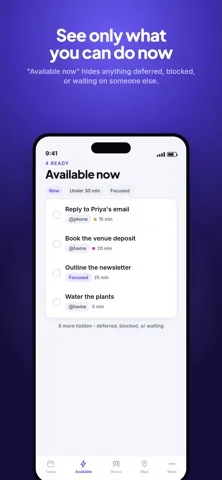
Tell Tasker how much time and energy you have, and it shows what is doable right now. It captures a task from one sentence, packs a day that fits, and keeps everything on your devices.
Try it: capture
Type it the way you'd say it.
Tasker reads dates, times, priority, estimates, energy, tags and repeats out of one sentence, on the device, with no model and no network. This is a JavaScript port of the same rules running in your browser.
Words it doesn't recognise stay in the title. It never invents a date or drops what you typed.
Nothing to pick up yet. Try a day, a time or a #tag.
Try it: plan my day
A plan that fits, and says what doesn't.
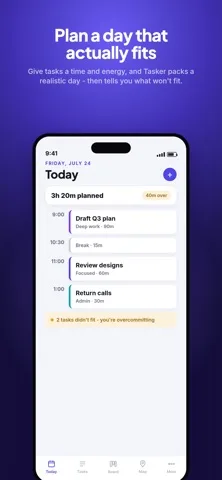
The planner puts overdue work first, then priority, then due date, then tasks that match your energy, and packs them into your time budget. Whatever doesn't fit is called out, so you stop overcommitting. With calendar access, it fits the plan around your meetings.
Same ranking and packing rules as the app's built-in planner. In the app, an AI provider you choose can rank first; the router still enforces your budget, and the built-in planner always answers.
Assistants
Assistants that ask before they act.
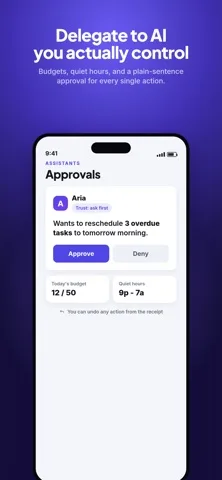
Hand a task to an AI assistant and it works like someone you hired: it has a trust level per kind of action, a budget, quiet hours, and a pause switch. Every change passes one gate with three outcomes: allowed, needs your OK, or refused with a reason.
- Paused? The red switch stops every assistant, on every device.
- Just reading? Always fine.
- Quiet hours? Nothing changes.
- Over budget? Actions per run and tokens per day.
- Trusted enough? If not, you get a card. Deleting always asks.
Move 3 overdue tasks to tomorrow at 9:00?
The first answer wins, whether it comes from the app, Apple Watch or the assistant's own client. Every step leaves a plain-sentence receipt.
Intelligence on your terms
The first brain that answers wins. The floor always does.
Planning tries each source you've turned on, in order. Models only ever see a task's title, estimate, due date, priority and energy, never your notes.
- A paired deviceYour Mac over Wi-Fi plans for your phone.
- Apple IntelligenceOn this device.
- A local serverOllama, LM Studio or llama.cpp on your network.
- Your own keyOpenAI, Groq, Mistral and other compatible providers.
- Built-in plannerAlways there, fully offline.
Private by design
No account. No server. Nothing to trust.
On your device
Everything works offline. There is no Tasker backend, no analytics, and the developer collects no data.
Your own iCloud
Optional sync through your private iCloud database. Notes and pages are sealed with AES-GCM first, so even iCloud sees ciphertext.
Your own Wi-Fi
Pair devices with a QR code to share tasks, sync and lend AI to each other, with no account and no internet.
For developers
Plug in any AI client, under the same rules.
Tasker ships task-mcp, a Model Context Protocol server. Give Claude Desktop or any MCP client a key from Tasker's Assistants screen, and it works on your local tasks through the same gate, with approvals that survive restarts. Keys fail closed.
{
  "mcpServers": {
    "tasker": {
      "command": "/path/to/task-mcp",
      "args": ["--store", "/path/to/store.store",
               "--key", "tk_…",
               "--client", "Claude Desktop"]
    }
  }
}
Behind the build
From the journal
Tasker started with field teams
From field service software to a private day planner that knows how much time and energy you actually have.
I just made Tasker completely free
Plan the day you actually have. Every feature unlocked, private by design, native on every Apple device.
Free on the App Store.
Every feature, for everyone. An optional tip unlocks nothing, because everything already is.